Search

Register Your Location

Showcase your location to film and TV productions nationwide

Reach Productions Nationwide

Location DB is a new filming location database used by production companies and location scouts nationwide. Register your location and connect with productions searching for spaces like yours.

Why Register Your Location?

National Exposure

Your location will be showcased to production companies, location scouts, and creative professionals across the country searching for their perfect filming spot.

Potential Income

Hosting film and television productions can provide a valuable income stream while supporting the creative industries.

Support the Local Industry

North Somerset sits adjacent to Bristol, home to The Bottle Yard Studios – one of the UK's leading production hubs. By registering your location, you're supporting this thriving creative economy right on our doorstep.

Smart AI Search

LocationDB uses AI to analyse your images in addition to text. If a scout searches for "red phone box" and your photos show one, you'll appear in results – even if you never mentioned it in the description. This visual search makes it easier for you to promote your space.

How to Register

What you’ll need: Photos of your location, property details, and contact information — it only takes 5-10 minutes.

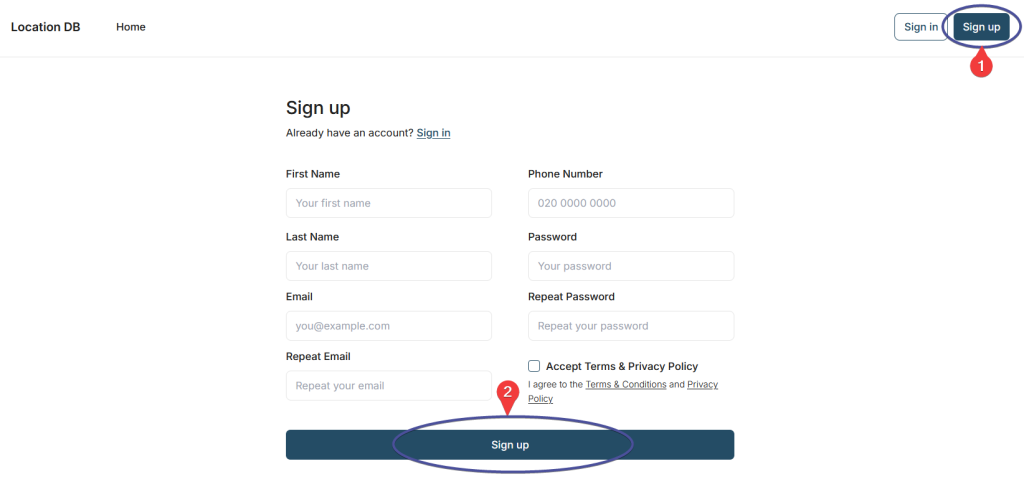
Step 1: Create Your Account

Visit Location DB and click “Sign up” in the top right corner.

You’ll need to provide:

  • Your name
  • Contact email address
  • Phone number
  • A password
  • Accept the Terms & Conditions

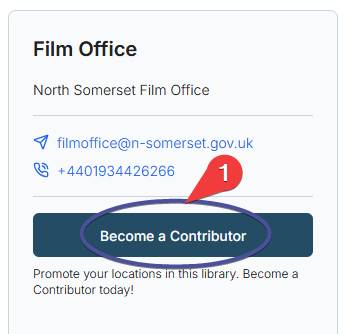
Step 2: Request Contributor Access

Once your account is verified, visit the North Somerset Film Office library page and click “Become a Contributor“.

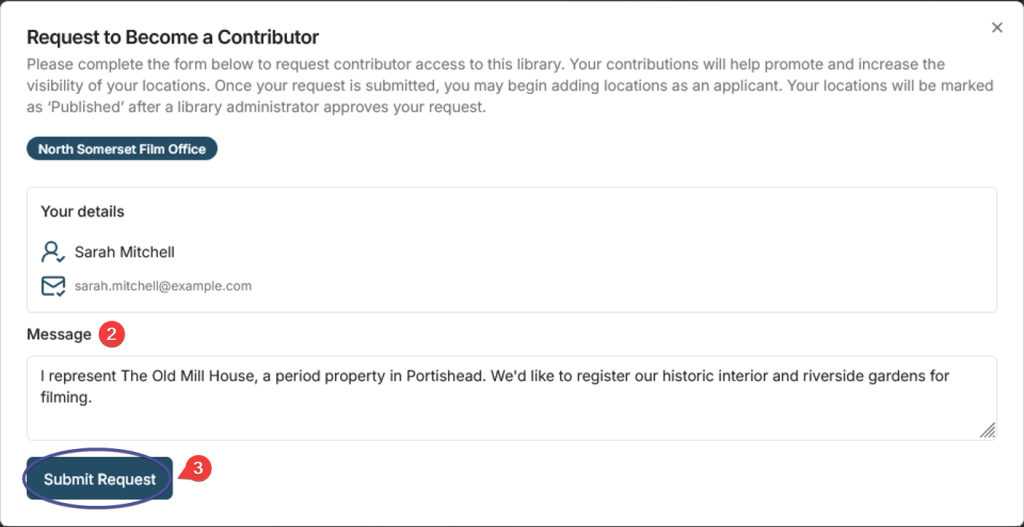
You’ll be asked to confirm your details and provide a brief message. Please include:

  • Whether you’re registering as a business, organisation, or private resident
  • The name of your location or business
  • A brief description of what you’re offering (e.g., “Georgian town house” or “Industrial warehouse space”)

This helps us process your request quickly.

Step 3: Add Your Location

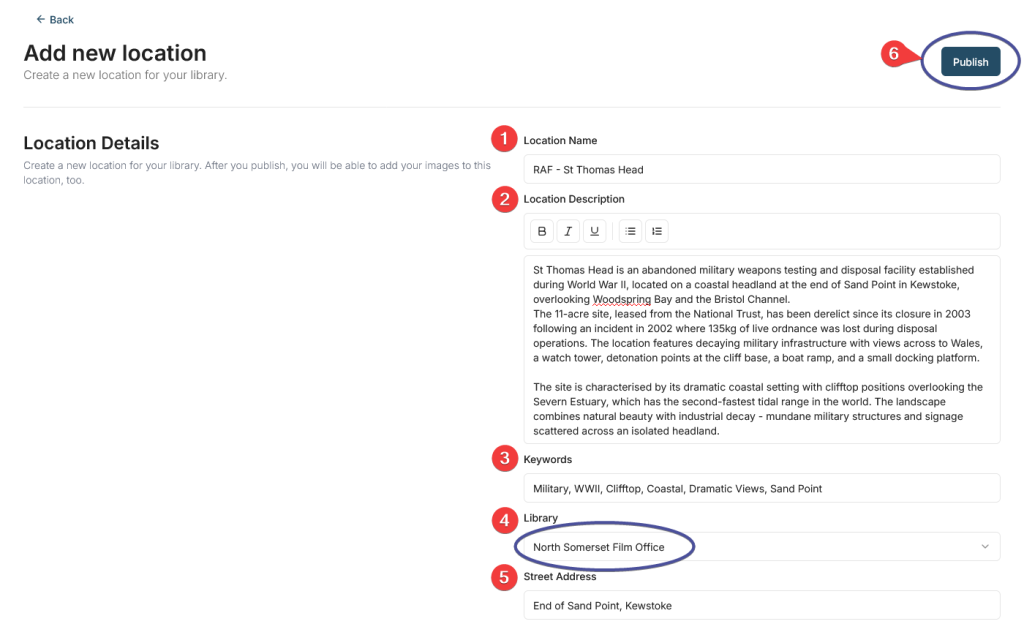
Once approved, you can start adding your locations. Click “Add New Location” and complete the form.

Location Name: The name of your property or location (e.g., “Ashcombe Park” or “The Old Fire Station”)

Location Description: Describe your location in detail. Include:

  • Type of property and architectural style
  • Key features and rooms available
  • Approximate size and capacity
  • Historical significance (if applicable)
  • Any unique characteristics
  • Filming restrictions or requirements


Keywords: Add relevant keywords that describe your location (e.g., “Castle, Fort, Park, Modern, Victorian”)

Address Details: Complete address including street address, city, country, and postcode. 

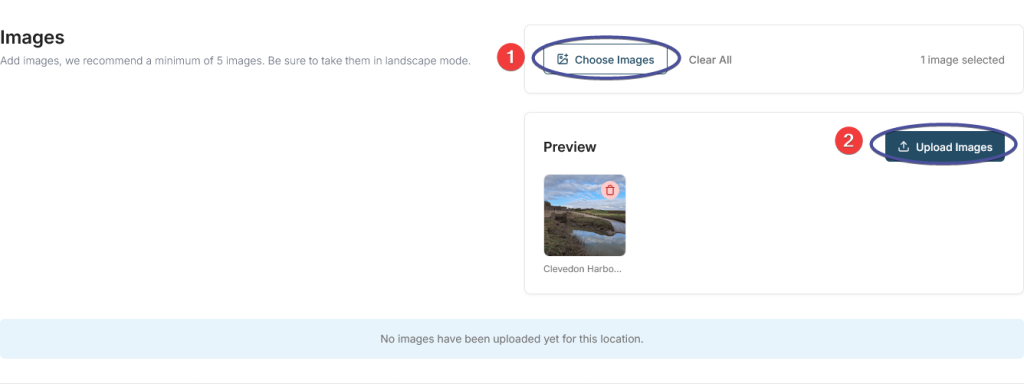
Step 4: Upload Your Images

After clicking “Publish” in Step 3, the page will automatically scroll down to the Images section.

Minimum Requirement: We recommend uploading at least 5 images of your location.

Technical Requirements:

  • Images must be under 10MB each
  • Recommended maximum resolution: 8K UHD (7680 × 4320 pixels)
  • Images should be in landscape orientation where possible
  • JPEG format
  • Colour photos only (no black and white)

Updating Your Location Listing

You have full control to edit, update, or manage your location listings at any time. Here’s how:

Access Your Locations:

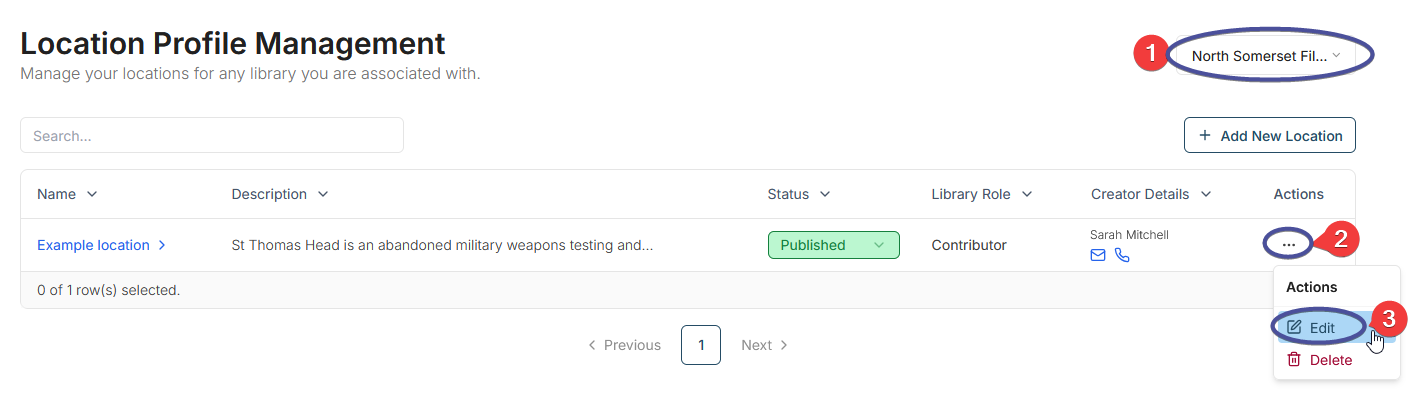
Visit locationdb.com/management/locations or click ManagementLocation Profile Management in the website header.

Find Your Location:

  1. Use the library filter on the right to select North Somerset Film Office
  2. You’ll see a table listing all your locations
  3. Click the three dots under Actions to access Edit or Delete options

Make Your Updates:

  1. Click Edit to modify your location details
  2. Update any information including description, keywords, address, or images
  3. Important: Click Publish at the top of the page to save your changes
  4. You’ll see a green confirmation message: “Location updated successfully”

What You Can Update:

  1. Location name and description
  2. Keywords and address details
  3. Photos and images
  4. Publication status (Draft/Published)

Need help? Contact us at filmoffice@n-somerset.gov.uk

Photography Tips

Great photography is essential for showcasing your location effectively. Follow these guidelines from Filming in England:

Lighting & Weather

  • Take photos during daytime in good natural light
  • Avoid gloomy or rainy days
  • Don’t use flash – rely on natural light
  • Avoid snowy conditions

Exterior Photos

  • Wide shots from all angles (front, back, sides)
  • Stand back as far as possible
  • Clear the area of parked cars if possible
  • Include gardens and outbuildings
  • Show surrounding views

Interior Photos

  • Photograph all main rooms available for filming
  • Ensure adequate lighting (turn on lights/lamps)
  • Multiple shots from different corners
  • Include straight-on shots and angled views
  • Show room features naturally

Dos & Don'ts

  • ✓ Ensure property is clean and tidy
  • ✓ Show space and scale
  • ✗ Don’t include people or pets
  • ✗ Don’t use close-ups of individual features
  • ✗ Don’t use filters or heavy editing
Search